

We are all familiar with HPE Nonstop SQL/MX Database, one of the world’s robust and scalable distributed relational database systems, renowned for its fault tolerance and high availability. With its fast OLTP capabilities, customers use SQL/MX in various sectors, including finance, stock exchanges, telecommunications, and mission-critical applications. This highlights the need to maintain a safe database for recovery in the event of system hardware or software failures, application outages, or other similar incidents.
This article serves as a guide to backup and restore the SQL/MX database using the PAK2/UNPAK2 utility.
TMF and BR2
The TMF (Transaction Management Facility) protects SQL/MX databases by managing transactions and allowing recovery through dump files and audit trails. Customers should follow established guidelines and implement scheduled daily database dumps as part of their routine, enabling quick recovery in the event of unexpected data loss or system failure. TMF Online Dump serves as a primary mechanism for safeguarding NonStop SQL data, offering the advantage of requiring no database downtime.
Another important mechanism to protect your SQL/MX databases is to use the Backup/Restore 2 (BR2) product. It supports backing up and restoring both SQL/MX and OSS entities.
When TMF can provide online backup support, what is the need for BR2? The answer is that an SQL/MX object recovered by TMF may or may not be consistent with the current metadata description of the object. It means that if the schema of the SQL/MX table is changed after the TMF dump is taken, then the dump cannot be used to recover the SQL/MX data that was backed up. In other words, TMF Online DUMP does not take a backup of the DDL structure of the SQL/MX table but only the table data.
BR2 ensures full backup of the DDL structure and the data in the SQL/MX tables. While TMF DUMP is online, BR2 is mostly offline.
BRCOM and PAK2/UNPAK2
BRCOM, which is part of the BR2 product, is an interface on the guardian side that allows customers to issue the backup or restore commands. It mainly supports backing up data to tapes mounted on the Nonstop systems. It supports both SQL/MX and OSS objects.
PAK2/UNPAK2 is an OSS utility to archive OSS or SQL/MX objects to disk. It does not require expertise in the tape system to perform backup and restore of SQL/MX objects.
PAK2/UNPAK2 uses BR2 to perform the backup and restore operation.
BACKUP and RESTORE JOB OPTIONS
Job options are settings specific to the backup or restore command. During backup, various backup job options can be specified in the PAK2 command. During restore, one or more restore job options can be specified in the UNPAK2 command.
|
BACKUP/RESTORE JOB OPTIONS |
BACKUP-ONLY JOB OPTIONS |
RESTORE-ONLY JOB OPTIONS |
||
|
|
|
*The default value of the job option is in bold.
CREATING SQL/MX OBJECTS
You can create SQL/MX objects via MXCI (SQL/MX Conversational Interface). Refer SQL/MX User Guide to create SQL/MX objects.
SQL/MX OBJECT HIERARCHY
For each object type, the keyword to be used in the PAK2/UNPAK2 command is given in the brackets.
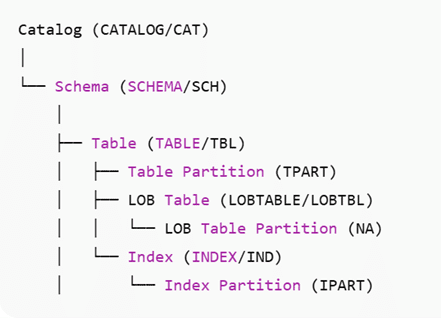
Although Indexes and LOB tables reside at the schema level and use three-part names, they are logically considered components of their associated table objects.
Schema Level Dependent Objects
- Views
- Stored Procedures in Java (SPJs)
- Synonyms
- External Sequence Generators
Table Level Dependent Objects
- Triggers
- Referential Integrity Constraints (RI constraints)
INSTALLATION
Install the T1355 product version supported for your Nonstop system. The files pak2 and unpak2are installed in the OSS location
/usr/tandem/pak2_unpak2/T1355<VERSION>_<DATE>_<SPR>, like
/usr/tandem/pak2_unpak2/T1355L01_22NOV24_AAF.
The location can be added to the system PATH variable for easy access to the pak2/unpak2executables.
export PATH=$PATH:/usr/tandem/pak2_unpak2/T1355L01_22NOV24_AAFIf PATH variable cannot be altered, create a symbolic link to these two files in /usr/bin or copy the files to the location /usr/bin, if needed.
Important Note
- PAK2 and UNPAK2 command syntax with special characters like (, ),/<,” must be enclosed in single quotes at the OSS prompt of the Nonstop System.
pak2 testpak, 'MX ((SCH "CATALOG1".SCHEMA1) WHERE (EOF < 12288))', LISTALL ON- Alternatively, each special character can be escaped with a backslash character ‘\’ or enclosed within a single quote.
pak2 testpak, MX '(' '('SCH \"CATALOG1\".SCHEMA2')' WHERE \(EOF '>' 0 \) ')', LISTALL ON- A backslash character ‘\’ can be used as a line break to split the commands into multiple lines. It is not needed in the last line of the command in the OSS shell prompt. If line breaks are used to split the command, then each special character in the command must be escaped with a backslash character ‘\’ or enclosed within a single quote.
pak2 testpak, MX '(' '('SCH \"CATALOG1\".SCHEMA2')' WHERE \ '('EOF '>' 0 ')' ')', LISTALL ON- The PAK2/UNPAK2 or BR2 command syntax is not case OSS path names are case sensitive. For example, pak2 and unpak2 are OSS executables, and hence they are case sensitive.
pak2 testpak, mx '(' '('sch \"CATALOG1\".schema2')' where '('eof '>' 0 ')' ')', listall ON.- It is not recommended to provide the OSS location of the guardian file (like /G/DATA1/testpak) as the archive name. Naming issues may arise when the archive size exceeds a certain limit and needs to be split into multiple files, as guardian file names have a length limit of 8 characters only.
In this article, the PAK2/UNPAK2 command syntax keywords are written in upper case, and the user-defined values are written in lower case for uniformity.
PAK2
It is a utility used to compress SQL/MX objects into archive files. It can also be described as it is used to back up SQL/MX objects as OSS files. Backup job options can be specified in the PAK2 command.
Authorisation
- Only a Super user (255,255) or an object owner can backup the schema and its subordinate objects.
- Only during catalog-level backup, any user is allowed to begin the backup, but the objects owned by the logged-in user are only backed up.
CATALOG Backup
Backs up the catalog and all underlying objects referred to as its subordinate objects as shown in the objects’ hierarchy.
pak2 /home/pakfiles/mycat_pak, MX CATALOG mycat, LISTALL ONmycat_pak is the archive file here. It can be specified with an absolute path or a relative path based on the current directory from which the command is executed.
- If there are any catalog names with delimited names, they must be included within the double
pak2 /home/pakfiles/mycat_pak, 'MX (CATALOG "myDelimited_cat")', LISTALL ON- To allow backup of SQL/MX objects even when the SQL/MX files are in open state (except for exclusive access), the OPEN ON job option is used.
pak2 /home/pakfiles/mycat_pak, MX CATALOG mycat, LISTALL ON, OPEN ONSCHEMA Backup
Backs up the schema and all its subordinate objects, along with schema-level dependent objects.
pak2 /home/pakfiles/mysch_pak, MX SCHEMA mycat.mysch, LISTALL ONTABLE Backup
Backs up the table and its subordinate objects, along with table-level dependent objects.
pak2 /home/pakfiles/mytab_pak, MX TABLE mycat.mysch.mytab, \ LISTALL ON‘\’ is used as line break here.
- To exclude the indexes while backing up the table, specify both INDEXES EXCLUDED and CONSTRAINTS EXCLUDED job options together.
pak2 /home/pakfiles/mytab_pak, MX TABLE mycat.mysch.mytab, \ LISTALL ON, CONSTRAINTS EXCLUDED, INDEXES EXCLUDED- To exclude table data in the table during backup, specify the SQLDATA OFF job It also excludes LOB table data if the table has any LOB columns in it.
pak2 /home/pakfiles/mytab_pak, MX TBL mycat.mysch.mytab, LISTALL ON, SQLDATA OFF- To exclude only LOB table data during table backup, specify the LOBDATA OFF job
pak2 /home/pakfiles/mytab_pak, MX TBL mycat.mysch.my_lob_tab, LISTALL ON, LOBDATA OFFLOBDATA ON and SQLDATA OFF job options cannot be specified together. SQLDATA OFF implicitly sets LOBDATA to OFF.
LOBTABLE Backup
Backup one or more LOB tables of the LOB columns in a SQL/MX table. If table mycat.mysch.my_lob_tab has LOB columns l1 and l2, two LOB tables l1_tab and l2_tab are associated with the table my_lob_tab. The LOB tables can be backed up individually, whereas the LOB table partitions cannot be backed up individually.
pak2 /home/pakfiles/mylobtab1_pak, MX LOBTABLE mycat.mysch.l1_tab, LISTALL ONpak2 /home/pakfiles/mylobtab2_pak, 'MX (LOBTBL mycat.mysch.l1_tab, LOBTABLE mycat.mysch.l2_tab)', LISTALL ONLOBDATA OFF and SQLDATA OFF job options are not applicable, as the LOB table backup is mainly intended to backup LOB table data.
INDEX Backup
Backs up the SQL/MX index on a table. INDEXES EXCLUDED and CONSTRAINTS EXCLUDED cannot be specified as the INDEX backup is intended to take a backup of indexes.
pak2 /home/pakfiles/ind_pak, MX INDEX mycat.mysch.ind1, LISTALL ONpak2 /home/pakfiles/ind_pak, 'MX (INDEX mycat.mysch.ind1, IND mycat.mysch.ind2)', LISTALL ONTABLE PARTITION Backup
Backs up the table partition of the SQL/MX table individually. It is allowed to specify more than one partition of a table in the same command.
Must specify job options:
-
- PARTONLY ON
- CONSTRAINTS EXCLUDED
- INDEXES EXCLUDED
pak2 /home/pakfiles/part1_pak, 'MX TPART mycat.mysch.mytab PARTITION (part1)’, LISTALL ON, PARTONLY ON, INDEXES EXCLUDED, CONSTRAINTS EXCLUDEDpak2 /home/pakfiles/part_pak, 'MX (TPART mycat.mysch.mytab PARTITION (part1, part2, part3))', LISTALL ON, PARTONLY ON, INDEXES EXCLUDED, CONSTRAINTS EXCLUDEDINDEX PARTITION Backup
Backs up the index partitions of the SQL/MX table. More than one index partition can be specified in the command. PARTONLY ON job option must be specified.
pak2 /home/pakfiles/ipart1_pak, 'MX IPART mycat.mysch.ind1 PARTITION (ipart1), LISTALL ON, PARTONLY ONpak2 /home/pakfiles/ipart_pak, 'MX (IPART mycat.mysch.ind1 PARTITION (part1, part2, part3))', LISTALL ON, PARTONLY ONMultiple Objects Backup
Backs up different types of objects in the same command. If the same object is repeated more than once, backup is taken only once. For example, if a catalog c1 and the table c1.s1.t1 in the same catalog are specified in a single backup command, the table is backed up only once.
pak2 /home/pakfiles/multi_pak, 'MX (CATALOG cat2, TABLE cat1.sch1.tab1, TPART cat1.sch2.tab2 PARTITION (TPART5))', PARTONLY ON, INDEXES EXCLUDED, CONSTRAINTS EXCLUDED, LISTALL ONBackup with Filtering
The WHERE clause can be used with any of the above PAK2 commands to filter out certain objects from getting backed up. SQL/MX supported filters are:
| FILTER | Valid for Object | Examples |
| OWNER | SCHEMA | OWNER = SQL.USER1 OWNER = SQL.* OWNER = 20,30 OWNER = 20,* |
| CREATIONTIME | TABLE | CREATIONTIME AFTER 02 JUL 2025
08:25:30 |
| LASTOPENTIME | TABLE/INDEX PARTITIONS | LASTOPENTIME BEFORE JUL 2 2025 |
| MODTIME | TABLE/INDEX PARTITIONS | MODTIME > 1 JAN 2024 |
| REDEFINITIONTIME | TABLE and INDEX | REDEFINITIONTIME < 31 JUN 2025 |
| TABLE | ALL | TABLE |
| EOF | TABLE/INDEX PARTITIONS | EOF > 2000 EOF <= 30000 EOF = 0 EOF <> 0 |
pak2 /home/pakfiles/filter_pak1, 'MX (CATALOG cat2, TABLE cat1.sch1.tab1, TPART cat1.sch2.tab2 PARTITION (TPART5)) WHERE (CREATIONTIME BEFORE 1 JUL 2025), PARTONLY ON, INDEXES EXCLUDED, CONSTRAINTS EXCLUDED, LISTALL ONpak2 /home/pakfiles/filter_pak2, 'MX (CATALOG cat2, TABLE cat1.sch1.tab1, TPART cat1.sch2.tab2 PARTITION (TPART5)) WHERE (EOF <> 0)', PARTONLY ON, INDEXES EXCLUDED, CONSTRAINTS EXCLUDED, LISTALL ONUNPAK2
One can restore a SQL/MX object from the same level of backup or a higher level of backup using UNPAK2. For example, one can use a catalog backup and perform a table restore but the reverse is not recommended.
You can restore the same SQL/MX object that was backed up or specify a different target object using the TARGET/ TGT clause in the unpak2 command i.e., you can backup table c1.s1.t1 and restore the data to the same table c1.s1.t1 or a different target schema c2.s2 or a different table in the same target schema c1.s1.t2.
Authorisation
- Only Super user (255,255) or an object owner can restore the schema and its subordinate objects.
- Only in catalog-level restore, any user is allowed to begin the restore, but the objects owned by the logged-in user are only restored.
CATALOG Restore
Restores the catalog and all its underlying objects referred to as its subordinate objects, as shown in the objects’ hierarchy. You can restore the backed-up catalog, called the source catalog, into a different catalog with a different name, called the target catalog.
unpak2 /home/pakfiles/mycat_pak, 'MX CATALOG mycat, LISTALL ONunpak2 /home/pakfiles/mycat_pak, 'MX (CATALOG mycat, TGT CAT tgtcat)', LISTALL ON- To restore to a different system, the LOCATION job option must be used if the data volumes used by the SQL/MX objects in the source system are different from those of the target system. It is necessary to map all the volumes that are used by the objects in the backup for a successful restore of all the objects.
unpak2 /home/pakfiles/mycat_pak, 'MX (CATALOG mycat, TGT CAT tgtcat), LISTALL ON, LOCATION (\SYS1.$DATA5 to \SYS2.$SAS4,\SYS1.$DATA2 to \SYS2.$SAS3, \SYS1.$DATA7 to \SYS2.$SAS8)'- To restore both schema-level and table-level dependent objects, SHOWDDL ON, SHOWDDLLOC <oss-location> and OBEYDDL ON must be used together. The location specified in the SHOWDDLLOC job option must exist.
unpak2 /home/pakfiles/mycat_pak, 'MX (CATALOG mycat, TGT CAT tgtcat), LISTALL ON, SHOWDDL ON, SHOWDDLLOC /home/ddl_loc, OBEYDDL ON'
The SHOWDDDL files are generated in the OSS location /home/ddl_loc for views, SPJs, RIs, Triggers, etc. If the OBEYDDL job option is not specified, then SHOWDDL files must be manually obeyed by the user to restore the dependent objects.
- During restore, the LISTONLY ON job option is used to list the objects in the backup without being restored.
unpak2 /home/pakfilesk/mycat_pak, MX CATALOG mycat, LISTONLY ONSCHEMA Restore
Restores the schema and all its subordinate objects. Schema can be restored to a different target catalog (with the same name as the source schema) or a different target schema (with a different name than the source schema).
unpak2 /home/pakfiles/mysch_pak, MX SCHEMA mycat.mysch, LISTALL ONunpak2 /home/pakfiles/mysch_pak, 'MX (SCHEMA mycat.mysch, TGT SCH tgtcat.tgtsch )', LISTALL ON- The schema can be restored from the catalog-level or schema-level backup. The target can be specified one level higher than the source. Here, the schema is restored as mysch.
unpak2 /home/pakfiles/mycat_pak, 'MX (SCHEMA mycat.mysch, TGT CAT tgtcat)', LISTALL ON- To restore both schema-level and table-level dependent objects, SHOWDDL ON, SHOWDDLLOC <oss-location>, and OBEYDDL ON must be used together.
unpak2 /home/pakfiles/mycat_pak, 'MX (CATALOG mycat, TGT CAT tgtcat, LISTALL ON, SHOWDDL ON, SHOWDDLLOC /home/ddl_loc, OBEYDDL ON'TABLE Restore
Restores the table and its subordinate objects. The catalog-level or schema-level backup can be used to restore. The table can be restored to a different target schema or a table name.
unpak2 /home/pakfiles/mytab_pak, MX TABLE mycat.mysch.mytab, LISTALL ON- To restore the table-level dependent objects, SHOWDDL ON, SHOWDDLLOC <oss-location>, and OBEYDDL ON must be used together.
unpak2 /home/pakfiles/mycat_pak, 'MX (TABLE mycat.mysch.mytab, TGT SCH tgtcat.tgtsch ), LISTALL ON, SHOWDDL ON, SHOWDDLLOC /home/ddl_loc, OBEYDDL ON'- To skip restoring the already existing objects in the target schema, KEEP ON job option can be used. Only non-existent objects are restored if this option is specified. It is not applicable for dependent objects.
unpak2 /home/pakfiles/mycat_pak, 'MX (TABLE mycat.mysch.mytab, TGT TBL tgtcat.tgtsch.tgttab), LISTALL ON, KEEP ON'If the table tgtcat.tgtsch.tgttab already exists, then the table is skipped to be restored with a warning. This job option can also be used in the schema-level restore.
-
To only restore DDL and skip the data in the partitions of the table or index, the SQLDATA OFF option can be used.
unpak2 /home/pakfiles/mytab_pak, 'MX (TABLE mycat.mysch.mytab, TGT TBL tgtcat.tgtsch.tgttab)', LISTALL ON, SQLDATA OFF- To only restore DDL and skip the data in the partitions of the LOB tables only, LOBDATA OFF can be used.
unpak2 /home/pakfiles/mytab_pak, 'MX (TABLE mycat.mysch.mytab, TGT TBL tgtcat.tgtsch.tgttab)', LISTALL ON, LOBDATA OFFPoints to remember:
-
- SQLDATA OFF and LOBDATA ON cannot be used together.
- Backups taken with SQLDATA/LOBDATA OFF cannot be used to restore with SQLDATA/LOBDATA ON.
- During restore, an SQL/MX target table is restored with its partitions’ Guardian File Names (GFN) the same as the source table. If the source table also exists in the same system, then the table restore operation will fail since the same GFNs exist in the To allow restore of the target table with different GFNs than the source table, the KEEPGFN OFF job option can be used. This is applicable in catalog-level, schema-level, and table-level restores.
unpak2 /home/pakfiles/mytab_pak, 'MX(TABLE mycat.mysch.mytab, TGT TBL tgtcat.tgtsch.tgttab)', LISTALL ON, KEEPGFN OFFLOBTABLE Restore
Restore one or more LOB tables of the LOB columns in an SQL/MX table individually. LOBDATA OFF is not applicable as LOB table restores are meant for restoring the LOB table data.
Points to remember:
-
- The TARGET or TGT option must be specified.
- Only TABLE can be specified as the TARGET option
- Target table must exist with the LOB Tables with the same name or a different name.
- Source and target tables must match in their DDL structure.
unpak2 /home/pakfiles/mylobtab1_pak, 'MX (LOBTBL mycat.mysch.l1_tab, TGT TBL tgtcat.tgtsch.tgttab)', LISTALL ONINDEX Restore
Restores the SQL/MX index on a target table. INDEXES EXCLUDED job option should not be used in the INDEX restore. The index can be restored only to the target table of the same name as the source. Only TABLE can be specified as the TARGET option.
unpak2 /home/pakfiles/mycat_pak, 'MX (IND mycat.mysch.ind1, TGT TABLE tgtcat.tgtsch.mytab)', LISTALL ONTABLE PARTITION Restore
Restores one or more table partitions of the SQL/MX table. More than one table partition can be specified in the restore command. Only TABLE can be specified as the TARGET option.
Must specify job options:
-
- PARTONLY ON
- CONSTRAINTS EXCLUDED
- INDEXES EXCLUDED
The source and target tables should match in the DDL structure. The partition restore must be exercised with caution. The DDL locks on the targe table would be removed on successful restore of all the partitions of the table.
unpak2 /home/pakfiles/part1_pak, 'MX TPART mycat.mysch.mytab PARTITION (part1)', LISTALL ON, INDEXES EXCLUDED, CONSTRAINTS EXCLUDED, PARTONLY ONunpak2 /home/pakfiles/part_pak, 'MX (TPART mycat.mysch.mytab PARTITION (part1, part2, part3), TGT TABLE tgtcat.tgtsch.tgttab)', LISTALL ON, PARTONLY ON, INDEXES EXCLUDED, CONSTRAINTS EXCLUDEDINDEX PARTITION Restore
Restores the index partitions of the SQL/MX table’s index. Only INDEX can be specified as the TARGET option. More than one partition can be specified in the restore command. PARTONLY ON job option must be specified.
unpak2 /home/pakfiles/ipart1_pak, 'MX IPART mycat.mysch.ind1 PARTITION (ipart1)', LISTALL ON, PARTONLY ONunpak2 /home/pakfiles/ipart_pak, MX '(IPART mycat.mysch.ind1 PARTITION (part1, part2, part3), TGT INDEX tgtcat.tgtsch.ind1)', LISTALL ON, PARTONLY ONMultiple Objects Restore
Restore different types of objects in the same command. If the same object is repeated more than once, the restore is done only once. For example, a catalog c1 is specified, and the table c1.s1.t1 in the same catalog is specified in the single restore command, the table is restored only once.
unpak2 /home/pakfiles/multi_pak, 'MX (CATALOG cat2, TABLE cat1.sch1.tab1, TPART cat1.sch2.tab2 PARTITION (TPART5))', PARTONLY ON, INDEXES EXCLUDED, CONSTRAINTS EXCLUDED, LISTALL ONRestore with Filtering
The WHERE clause can be used with any of the above UNPAK2 commands to filter out certain objects from getting backed up.
unpak2 /home/pakfiles/filter_pak1, 'MX (CATALOG cat2, TABLE cat1.sch1.tab1, TPART cat1.sch2.tab2 PARTITION (TPART5)) WHERE (CREATIONTIME BEFORE 1 JUL 2025)', PARTONLY ON, INDEXES EXCLUDED, CONSTRAINTS EXCLUDED, LISTALL ONunpak2 /home/pakfiles/filter_pak2, 'MX (CATALOG cat2, TABLE cat1.sch1.tab1, TPART cat1.sch2.tab2 PARTITION (TPART5)) WHERE (EOF<> 0)', PARTONLY ON, INDEXES EXCLUDED, CONSTRAINTS EXCLUDED, LISTALL ONPAK2-UNPAK2 SPECIFIC OPTIONS
With -i option and @infile
If the list of objects is large, the command can exceed the maximum limit of characters in the command line. The infile option can be used at such times. The infile must have the same commands starting from the MX keyword. It is not necessary to use the single quote enclosure to escape special characters.
pak2 -i /home/pakfiles/mytab_pak_in, @bkpinfilebkpinfile contentMX (TBL mycat.mysch.mytab), SQLDATA ON,LISTALL ON;unpak2 -i /home/pakfiles/mytab_pak_in, @restinfilerestinfile content:
MX (TABLE mycat.mysch.mytab, TARGET SCHEMA tgtcat.tgtsch), LOCATION (\SYS1.$DATA5 to \SYS2.$DBS01 ,\SYS1.$DATA2 to \SYS2.$DBS02 ,\SYS1.$DATA7 to \SYS2.$SAS2) , OBEYDDL ON,SHOWDDLLOC /home/ddl_loc/, SHOWDDL ON,SQLDATA ON, KEEPGFN OFF, LISTALL ON;Note for infile content
-
- It is not necessary to use the single quote to enclose the command with special characters.
- The command should terminate with a semicolon.
- The mandatory or minimum expected job option is LISTALL ON or WAIT ON.
PAK2-ONLY OPTIONS
split
Helps to create a multifile archive with input as {nnn| nnnK | nnnM} where the size of the archive can be specified in bytes or kilobytes or megabytes. Each file can grow up to a max of 2,144,722,944 bytes or up to what is specified in the split option. When the first file fills up, a second one is created. The names of the additional files are formed by appending a sequence number to the name of the first file.
pak2 -split 3562435534 testpak, MX CAT mycat, LISTALL ONpak2 -split 356K testpak, MX CAT mycat, LISTALL ONpak2 -split 946M testpak, MX SCH mycat.mysch, LISTALL ONThe files are named as testpak, testpak.1 and testpak.2 and so on.
nocompress
Backs up the given SQL/MX object without compressing the archive file.
pak2 -nocompress testpak, MX CAT mycat, LISTALL ONPAK2/UNPAK2 details are documented in the Open System Services (OSS) Guide and BR2 details are present in the Backup Restore 2 User Guide.
Backing up and restoring SQL/MX databases is essential for maintaining data integrity and ensuring business continuity. I believe this article can serve as a handy guide for users and DB administrators to use the PAK2/UNPAK2 tool effectively for safeguarding critical data through disk-based backups. By taking regular backups and archives, organizations can minimize downtime, recover quickly from failures, and maintain a secure and reliable database environment.
Be the first to comment